“Relational database” sounds like something that requires a computer science degree and at least three monitors.
Thankfully, you don’t need either.
If you’ve ever kept a list of people and a separate list of things those people did, you already have a starting point for understanding one.
Let’s break it down using something we can all appreciate: buying things we probably didn’t need. 😅
Imagine you own a little shop
You sell mugs. Cute ones. The kind someone buys even though their cabinet already requires strategic stacking.
You need to keep track of two things:
- Who your customers are.
- What they ordered.
So you make two tables.
And by “table,” I mean information organized into rows and columns. No furniture involved.
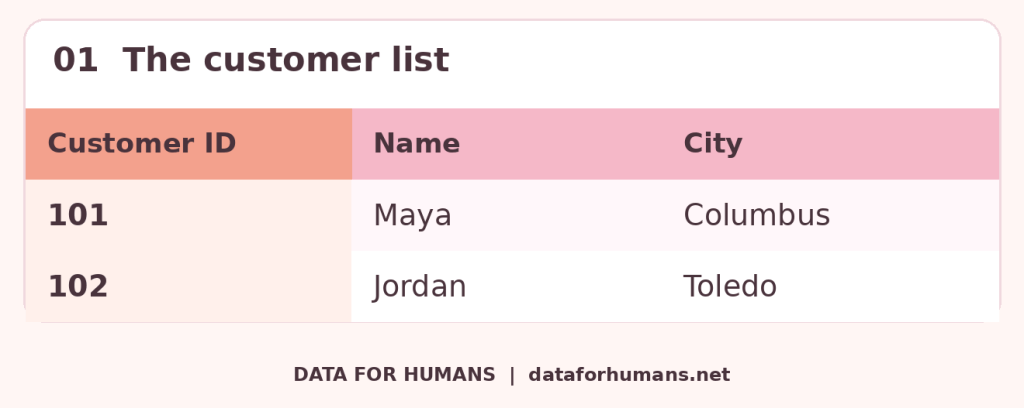
Here’s your customer list:
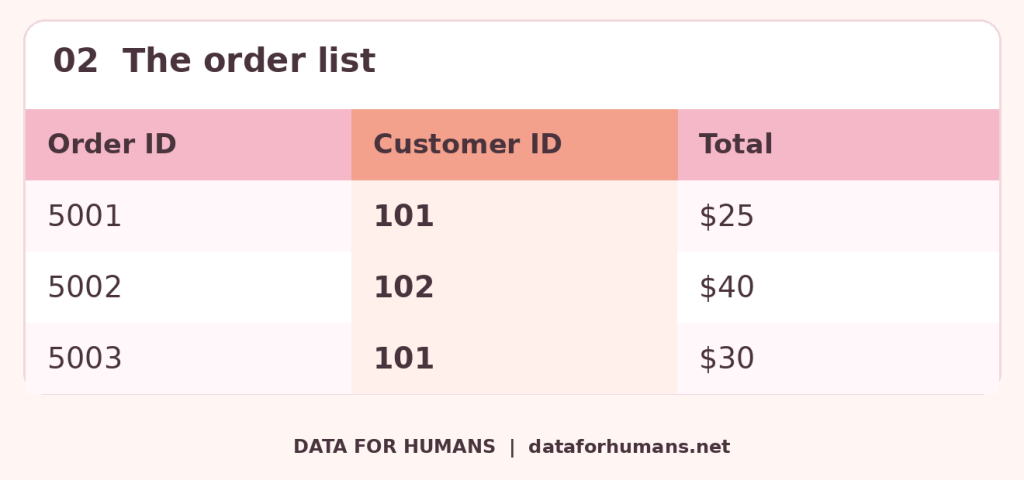
And here’s your order list:
Don’t let the numbers make this feel more complicated than it is.
Customer 101 is Maya.
Two orders have 101 in the Customer ID column.
That means both orders belong to Maya. She spent $55.
Apparently, Maya also has a mug problem. We support her.
That connection is the whole idea
A relational database stores information in tables and lets us connect related information using shared values.
In our example, that shared value is Customer ID.
Instead of putting every single detail into one enormous list, we keep customer information together and order information together.
Then we connect them when we need the full picture.
Think of a school:
- One list has the students.
- Another has the classes.
- Another tracks who is taking which class.
Or a library:
- One list has the books.
- Another has the members.
- Another tracks who borrowed what.
Same basic idea. Different information.
And hopefully fewer overdue books than I would personally be responsible for.
Why give people numbers? They already have names.
Fair question.
But what happens when you have two customers named Jordan Smith?
Or someone changes their last name?
Or you type “Mya” instead of “Maya” because you’re answering an email, eating lunch, and trying to do six things at once?
Names can repeat or change. An ID gives each customer a distinct reference.
It’s like a library card number. The library doesn’t have to guess which Sydney checked out that book.
There are two terms you might hear here:
Primary key: the value that uniquely identifies something in its own table. In our customer list, that’s Customer ID.
Foreign key: a value that refers to a record in another table. In our order list, Customer ID points back to the customer.
You don’t need to memorize those right now. There will be no surprise quiz. We have enough going on.
But couldn’t I just put everything in a spreadsheet?
Yes! Sometimes a spreadsheet is exactly what you need.
But imagine Maya orders something 20 different times.
If you copy her name, email, and address into every order, you now have 20 copies of her information.
Then Maya moves.
Now you’re updating her address in multiple places and hoping you didn’t miss one.
Because sending a mug to someone’s old house is a weird way to meet the new owners.
With separate, connected tables, you can keep her current address in her customer record. Her orders refer back to that record.
Less repeated information means fewer places for conflicting details to sneak in.
Where does SQL come into this?
You may have seen “SQL” in a job posting or heard someone mention it at work.
SQL is a language people use to work with information in many relational databases.
Think of the database as holding the information. SQL helps you ask it questions.
Things like:
- What did Maya order?
- How much did each customer spend?
- Which customers haven’t ordered recently?
You might also hear the word join.
A join brings information from tables together using a matching rule—like matching the Customer ID on an order to the Customer ID on our customer list.
Basically: “Find the customer who goes with this order.”
You do not need to learn code to understand why that’s useful.
Does a database magically fix messy information?
Oh, I wish.
You can still enter the wrong address. Create duplicate customers. Leave something blank that really needed an answer.
A database can have rules that help catch certain mistakes, but it still needs good setup and accurate information.
Putting a mess into a more impressive container does not automatically make it less of a mess.
See also: the basket of random things I moved out of sight while cleaning.
You’ve already got the basic idea
Customers and their orders.
Students and their classes.
Library members and their borrowed books.
These are all examples of information that belongs together without needing to live in one giant list.
A relational database helps keep those pieces organized and connected.
So the next time someone says “relational database,” you can picture Maya, her customer number, and her growing mug collection.
Suddenly, it sounds a lot less intimidating.
What’s something you keep track of in everyday life (kids’ activities, books, purchases) that could use a little more organization?
Tell me in the comments. 👇


Leave a comment